GPS Navigation: GPS, Maps
- 4.1
- Rating
- 500.00K
- Installs
- Free
- Price
 Analysis by App-foxy
I spent time with GPS Navigation: GPS, Maps as a practical route-finding tool rather than treating it like a full replacement for every navigation service. My overall impression is clear: it is a straightforward choice for people who want directions, map-based route planning, and spoken guidance without paying an upfront price. It is less convincing for someone who expects a highly polished travel ecosystem, deep transit information, or the broadest possible collection of advanced navigation tools.
The app sits in the Maps & Navigation category and comes from Appstark Tech. Its main appeal is easy to understand: enter a destination, follow the route, and let voice navigation help you keep your attention on the road. That simple purpose matters. Many people do not need a complicated planning platform for a short drive across town, a weekend visit to an unfamiliar neighborhood, or a quick check before leaving home.
On Android, the app is free to install and is suitable for Everyone. It has reached over 500 thousand installs and holds a 4.2 average from around 636 ratings, which suggests that a meaningful number of users find the basic experience useful. I would not treat those figures as proof that it is ideal for every driver, but they do make it easier to view the app as an established option rather than an untested download.
You May Also Like

 Blood Strike: 2.5 Anniversary
Blood Strike’s Loadouts Turn Every Drop Into a Tactical Gamble
A close look at Blood Strike’s custom loadouts: how fast access to signature weapons reshapes its battle royale rhythm, rewards preparation, and narrows the gap between fights.

 Pandora - Music & Podcasts
Pandora’s Music Is Easy to Start, but Harder to Recover
Pandora’s strength is its low-effort path from a seed to a station. Its weak spot is how much confidence it asks you to place in connection, setup, and quiet recovery.

 8 Ball Pool
 Is Built on Rivalries, Rematches, and Routine
A close look at the rivalries, rematches, shared routines, and unanswered safety questions that turn a quick pool match into a persistent mobile community.

 Samsung Music
’s Quiet Strength Is Playing What You Already Own
Its reach comes less from spectacle than from dependable access to a personal library. That simplicity is both the app’s strongest retention engine and its ceiling.

 AccuWeather: Weather Radar
AccuWeather Review: A Quick, Clear Forecast for Everyday Decisions
For everyday plans, the best forecast is the one you can understand quickly. AccuWeather makes rain timing, radar, and local conditions easy to act on, with a few trade-offs.

 Hill Climb Racing
Why Hill Climb Racing Still Turns Crashes Into One More Run
A tiny car, a bumpy hill and one more upgrade: Hill Climb Racing keeps resurfacing because its simple chaos makes every near-miss feel personal.
More From Our News Desk



How the navigation experience feels in everyday use
I find the everyday experience easiest to judge by looking at the small decisions around a trip: when to enter a destination, how much to rely on spoken prompts, and whether the route view is comfortable to follow. Those details matter more than a long feature checklist for routine driving, and they shape whether this app feels like a helpful companion or an extra screen to manage. Next, I turn to the choices that matter before switching from a navigation tool I already use.
A focused approach to getting from one place to another
The strongest part of GPS Navigation: GPS, Maps is its directness. The app is built around the moment when I already know where I want to go but need help choosing and following a route. That makes it suitable for ordinary errands: driving to a new medical office, finding a restaurant in an unfamiliar part of town, or reaching a friend’s home without repeatedly stopping to check a paper address or a separate map.
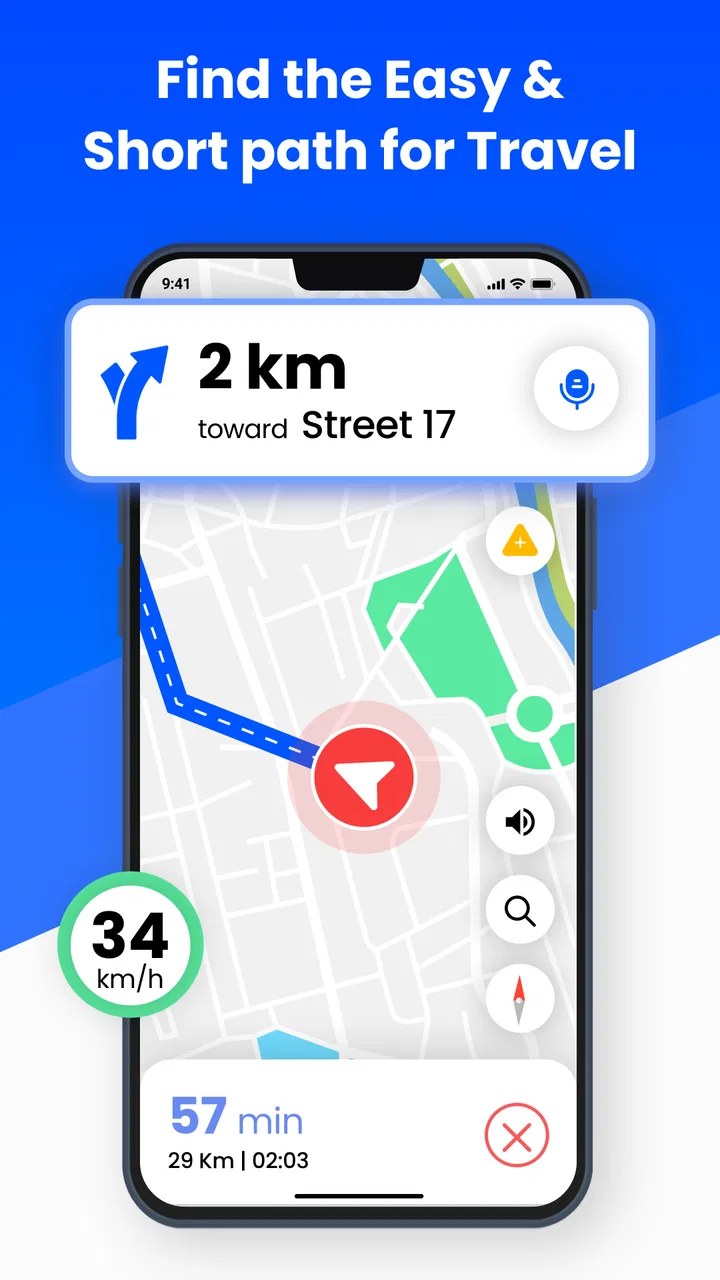
I also found the combination of map guidance and voice instructions useful when the road becomes busy. Looking down at a screen while approaching a junction is distracting, so spoken directions are more valuable than they may sound in a short store summary. The best way to use the app is to set the destination before moving, check the initial route carefully, and then rely on the audio prompts while driving.
That workflow also reveals an important practical point: the app is most helpful when I prepare rather than interact with it constantly. I would not use it as an excuse to handle the phone while the vehicle is in motion. A quick route check before departure, with the phone mounted where the screen is visible without blocking the road, makes the experience safer and less stressful.
Where it can save time beyond the obvious
A less obvious benefit is the way a dedicated navigation app can simplify decisions for occasional drivers. If I am borrowing a car, using a rental vehicle, or driving somewhere outside my normal routine, I may not want to spend time learning a complicated interface. A focused route tool can be easier to understand when the only immediate question is, “Which way should I go now?”
It can also be useful before leaving, not just during the journey. I like checking the general shape of a route in advance so I know whether the trip involves a long stretch on one major road, several turns close together, or a final approach through smaller streets. That preview helps me decide when to leave and whether I should ask a passenger to handle the phone once the trip begins.
For family use, the simple voice-navigation role has another advantage. A less confident driver can use it for familiar destinations that require one or two unfamiliar turns without needing to understand every advanced mapping feature. I would still recommend checking the destination and route personally before departure, especially when the address is new or the location has multiple entrances.
What the current version means for a new user
The current version is 1.27, and the app supports Android 7.0 or newer. That broad compatibility is helpful for people who keep an older phone as a backup or do not upgrade devices frequently. It also means the app is not limited to only the newest Android hardware, although the actual smoothness of map interaction will naturally depend on the phone itself.
Because the app is free, it is easy to try without committing money at the beginning. That lowers the risk for a driver who wants to compare it with the navigation app already installed on a phone. I recommend testing it on a familiar route first. A known journey lets me judge how clear the instructions feel and whether the map presentation suits my eyes before I depend on it in an unfamiliar area.
The presence of in-app purchases, ranging from $1.99 to $99.99 per item, is worth noticing before using the app regularly. The free entry point is attractive, but I would review any purchase screen carefully and decide whether an optional upgrade is genuinely useful for my needs. Someone looking for a completely uncomplicated free experience may prefer to avoid spending time evaluating extras.
The practical limits I noticed
The biggest weakness is not that the app tries to do too much; it is that a focused navigation tool may feel limited beside larger mapping platforms. Established alternatives often combine driving directions with extensive place information, public transport planning, walking routes, business details, saved locations, and a large connected account ecosystem. If those surrounding services are central to how you travel, this app may feel like only one piece of the puzzle.
I would be especially cautious about making it my only tool for complicated travel. A long trip involving multiple stops, changing transport types, unfamiliar parking arrangements, or detailed local exploration usually benefits from a broader map service. GPS Navigation: GPS, Maps makes more sense when the main task is point-to-point guidance, not when I am building an entire day around a destination.
Voice directions are helpful, but they do not remove the need for judgment. Road layouts change, signs can be confusing, and a route suggestion may not match my preferred lane, parking entrance, or local knowledge. I treat the app as an assistant rather than an authority. If a sign, road closure, or police instruction conflicts with the screen, the real-world instruction comes first.
There is also a human limitation that no navigation interface can solve: a driver can become too dependent on prompts. I find it better to listen for the next instruction while also noticing major roads, landmarks, and the direction of travel. That small habit makes it easier to recover if I miss a turn or need to stop safely and reassess.
How it compares with familiar alternatives
Compared with a major all-purpose mapping service, this app’s appeal is its narrower purpose and lower barrier to trying it. A large platform may be better for discovering businesses, checking several travel modes, organizing saved places, or combining navigation with other location-based information. GPS Navigation: GPS, Maps is a better fit when I want to keep the task centered on directions and spoken route guidance.
Compared with a dedicated offline navigation product, I would look carefully at how I plan to travel. Offline-focused tools are often chosen by people crossing areas with weak connectivity or by travelers who want to prepare maps before leaving. If that is my main concern, I would choose the option that clearly matches that workflow rather than assuming every GPS app offers the same offline experience.
Compared with the navigation system built into a car, a phone app can be more convenient when I change vehicles or need directions outside my usual car. The trade-off is that the phone depends on sensible mounting, adequate battery, and a distraction-free setup. For a driver whose vehicle already has a reliable integrated navigation system, this app may be more useful as a backup than as the primary display.
Who should use it and who should skip it
I would recommend GPS Navigation: GPS, Maps to casual drivers, commuters who want a simple route tool, students moving between unfamiliar places, and anyone who occasionally needs spoken directions without paying at installation. It also makes sense for people with older compatible Android phones who want to try a navigation alternative without replacing their device.
It is a particularly reasonable choice for short, ordinary journeys. Imagine leaving work for a new repair shop across town: I would enter the address while parked, examine the route, start the voice guidance, and let the app handle the next turns while I concentrate on traffic. Once I arrive, I would stop navigation rather than leave it running unnecessarily. That is the kind of small, repeatable use where its focused design feels appropriate.
I would skip it if my travel depends heavily on public transportation, detailed walking directions, extensive place reviews, complex multi-stop planning, or a mature collection of synchronized maps and saved locations. I would also compare alternatives first if I regularly drive through areas where connectivity is unreliable or if I need specialized information for international travel. In those cases, a broader or more travel-specific service may justify its extra complexity.
Small habits that make the app more useful
- Set the destination while parked: this gives me time to check the route and prevents rushed interaction once traffic starts moving.
- Use voice guidance as support, not as the only source of awareness: I still watch road signs, lane markings, and changing conditions.
- Test an unfamiliar destination in advance: a large building, campus, or shopping area may have several entrances, so I prefer to understand the final approach before I arrive.
- Keep a backup plan for difficult journeys: for remote roads, long trips, or complicated transfers, I would prepare another trusted source rather than depend on one app blindly.
These habits also expose the central trade-off. The app can reduce the mental effort of following a route, but it works best when I supply sensible preparation and common-sense driving decisions. No map screen should replace attention to the road, and no voice prompt can know every temporary change or local condition.
My final view after using it
GPS Navigation: GPS, Maps is a useful, approachable navigation app with a clear purpose. I like that it puts route guidance and voice instructions at the center instead of asking every user to learn a large collection of travel tools. The free starting point, Everyone age rating, compatibility with Android 7.0 and newer, and current version 1.27 make it accessible to a wide range of phone owners.
At the same time, I would not describe it as the universal answer for navigation. Its value depends on what I expect from a map app. For simple driving directions, occasional trips, and everyday point-to-point journeys, it is easy to recommend trying. For detailed travel planning, offline-first use, public transport, or a rich place-discovery experience, I would look at more specialized or broader alternatives.
My verdict is positive but specific: choose it when you want uncomplicated GPS guidance and spoken directions, and judge it by how comfortably it handles your normal routes. Appstark Tech has made an accessible option for basic navigation, but the smartest decision is to use it within its strengths rather than expect it to replace every mapping service on your phone.
With a 4.2 average from around 636 ratings and more than 500 thousand installs, it has enough user interest to deserve a fair trial. I would begin with familiar roads, decide whether the voice prompts and map view feel clear, and only then consider any optional in-app purchase. For the right driver, that modest testing process is all it takes to find out whether this free navigation app belongs in the daily toolkit.
FAQs for GPS Navigation: GPS, Maps
01What features does the GPS Navigation app offer?
The GPS Navigation app provides turn-by-turn navigation, real-time traffic updates, offline maps, and voice-guided directions. It includes features like route planning, speed limit notifications, and points of interest. The app also supports multiple map views and integrates with other apps for seamless travel planning.
02Is the GPS Navigation app available offline?
Yes, the GPS Navigation app offers offline capabilities. Users can download maps for specific regions to use without an internet connection. This feature is particularly useful for travelers in areas with limited connectivity, ensuring continuous navigation and access to essential map information.
03How accurate is the GPS Navigation app?
The app uses advanced GPS technology to provide highly accurate location tracking and navigation. Real-time traffic updates enhance route accuracy. However, accuracy can be affected by environmental factors such as tall buildings, dense forests, or tunnels, which may occasionally interfere with GPS signals.
04Does the app support multiple languages?
Yes, the GPS Navigation app supports multiple languages for both the interface and voice-guided directions. Users can select their preferred language from the settings menu, making it accessible to a global audience and ensuring clear, understandable navigation instructions.
05Are there in-app purchases or subscriptions required?
The GPS Navigation app offers both free and premium versions. The free version includes basic navigation features, while the premium version provides additional functionalities such as advanced traffic data and custom route settings. Subscriptions for the premium version are typically available monthly or annually.
Pros
- Highly accurate location tracking.
- Offline maps available for remote areas.
- User-friendly
- intuitive interface.
- Real-time traffic updates enhance planning.
- Extensive points of interest database.
Cons
- Consumes significant battery power.
- Ads can be intrusive at times.
- Occasional delays in route updates.
- Limited customization of map views.
- Requires large storage space for offline maps.

GPS Navigation: GPS, Maps
Gallery